Hidden
Hidden
Hidden
Hidden
Hidden
Hidden
1. Send "Underwriting Memo - Household Members" Email Template
2. Send SMS Template
We email AND text for the 1st 2 attempts.
Our corporate office notified us that another State Farm customer, XXXXXXXXXXX, may live at your address, but we don't have them linked to your household. Do you live together? You can also call us at XXXXXX if you have any questions!
3. Set 10 Day Pend to Follow Up on DL
Sample BOD Service Task Subject:
UMEMO: Who is Jane Doe in HH XXXXX?; em/sms 12/25
Leave good bread crumbs for where you are in the process. Be sure to start with "UMEMO: " in the subject line so the filters pick it up on the Underwriting Memo.

Once you get the info, submit via NECHO remarks against the auto policy.
2. Send SMS Template
We email AND text for the 1st 2 attempts.
This is from 's office. Our corporate office notified us that another State Farm customer, XXXXXXXXXXX, may live at your address, but we don't have them linked to your household. Do you live together? You can also call us at XXXXXX if you have any questions!
3. Set 10 Day Pend to Follow Up on DL
Sample BOD Service Task Subject:
UMEMO: Who is Jane Doe in HH XXXXX?; em/sms 12/25
Leave good bread crumbs for where you are in the process. Be sure to start with "UMEMO: " in the subject line so the filters pick it up on the Underwriting Memo.
Once you get the info, submit via NECHO remarks against the auto policy.
1. Send "Underwriting Memo - Student Away" Email Template
2. Send SMS Template
We email AND text for the 1st 2 attempts.
It's that time of year when we need some documentation for the Student Away at School Discount. I just sent an email with more information on what is required.
3. Set 10 Day Pend to Follow Up on Documentation
Sample BOD Service Task Subject:
UMEMO: Does XXXX qualify for Student Away Discount; em/sms 12/25
Leave good bread crumbs for where you are in the process. Be sure to start with "UMEMO: " in the subject line so the filters pick it up on the Underwriting Memo.
Once you get the info, submit via NECHO remarks against the auto policy.
2. Send SMS Template
We email AND text for the 1st 2 attempts.
This is from 's office. It's that time of year when we need some documentation for the Student Away at School Discount. I just sent an email with more information on what is required.
3. Set 10 Day Pend to Follow Up on Documentation
Sample BOD Service Task Subject:
UMEMO: Does XXXX qualify for Student Away Discount; em/sms 12/25
Leave good bread crumbs for where you are in the process. Be sure to start with "UMEMO: " in the subject line so the filters pick it up on the Underwriting Memo.
Once you get the info, submit via NECHO remarks against the auto policy.
1. Send "Underwriting Memo - Address Verification" Email Template
2. Send SMS Template
We email AND text for the 1st 2 attempts.
We were notified by our corporate office that you will need to submit documentation to verify the address for XXXXXXXX. Please check your email for acceptable documentation. Thanks!
3. Set 10 Day Pend to Follow Up on the documents
Sample BOD Service Task Subject:
UMEMO: Address Verification for XXXXX; em/sms 12/25
Leave good bread crumbs for where you are in the process. Be sure to start with "UMEMO: " in the subject line so the filters pick it up on the Underwriting Memo.
Once you get the info, submit via NECHO remarks against the auto policy.
2. Send SMS Template
We email AND text for the 1st 2 attempts.
This is from 's office. We were notified by our corporate office that you will need to submit documentation to verify the address for XXXXXXXX. Please check your email for acceptable documentation. Thanks!
3. Set 10 Day Pend to Follow Up on the documents
Sample BOD Service Task Subject:
UMEMO: Address Verification for XXXXX; em/sms 12/25
Leave good bread crumbs for where you are in the process. Be sure to start with "UMEMO: " in the subject line so the filters pick it up on the Underwriting Memo.
Once you get the info, submit via NECHO remarks against the auto policy.
This comes up because UW never received the select/reject forms.
Coverage is ADDED to the policy, and BACKDATED to the start date!
1. Double check you followed the process by checking recently closed ECRM tasks with "FORMS" in the subject line.
2. If you feel you did everything right, delete the UW memo, and add Chatter notes to your closed ECRM task.
"Coverage added by corporate because form never received."
If you feel the customer needs one more chance, call/email/sms them to GET THE FORM BACK!
Send "Issued - Premium Difference" Email Template
1. Open a Log in ECRM and paste MEMO into comments
1. Send "Credit Card Expiration" Email Template
2. Send SMS Template: ccinfo
We email AND text for the 1st 2 attempts.
Please call/text us to update the expiration date on your credit card, or update online at www.statefarm.com
3. Set 10 Day Pend to Follow Up on Credit Card
Sample BOD Service Task Subject:
BILLING: Credit Card exp; em/sms 12/25
Leave good bread crumbs for where you are in the process. Be sure to start with "BILLING: " in the subject line so the filters pick it up on the Billing List View.

2. Send SMS Template: ccinfo
We email AND text for the 1st 2 attempts.
This is from 's office. Please call/text us to update the expiration date on your credit card, or update online at www.statefarm.com
3. Set 10 Day Pend to Follow Up on Credit Card
Sample BOD Service Task Subject:
BILLING: Credit Card exp; em/sms 12/25
Leave good bread crumbs for where you are in the process. Be sure to start with "BILLING: " in the subject line so the filters pick it up on the Billing List View.
This comes up because the vehicle was involved in a total loss claim.
If you are licensed:
Contact the customer to discuss the situation. If there are no other vehicles in the household, you MAY need to keep coverage on the totaled vehicle so that coverage will extend to a rental car. It is also possible that they bought coverage on a rental car. If you determine you are going to remove or suspend coverage, be sure to make it effective the date AFTER the accident. In remarks, reference the claim number, and Auto should have no problem backdating the coverage if necessary.
If you are not licensed:
- Reply to the memo to get a time stamp of the original office notification (but do not send anywhere).
- Copy and paste the body of the email into an ECRM Task. The memo should be pasted in the comments section.
ECRM Task Subject Line: UMEMO: Total Loss - Coverage update required.
Assigned to: Your agent / someone in the office for review
Due Date: September 27, 2026
Tag agent/TM in Chatter: Can you please look into whether we need to submit a coverage change?
1. Send "Underwriting Memo - License Verification" Email Template
2. Send SMS Template
We email AND text for the 1st 2 attempts.
Please call the office with your driver's license - the one we have on file came back as invalid. It is best not to text or email this info to our office.
3. Set 10 Day Pend to Follow Up on DL
Sample ECRM Task Subject:
UMEMO: Need updated DL for XXXXX; em/sms 12/25
Leave good bread crumbs for where you are in the process. Be sure to start with "UMEMO: " in the subject line so the filters pick it up on the Underwriting Memo.

2. Send SMS Template
We email AND text for the 1st 2 attempts.
This is from 's office. Please call the office with your driver's license - the one we have on file came back as invalid. It is best not to text or email this info to our office.
3. Set 10 Day Pend to Follow Up on DL
Sample ECRM Task Subject:
UMEMO: Need updated DL for XXXXX; em/sms 12/25
Leave good bread crumbs for where you are in the process. Be sure to start with "UMEMO: " in the subject line so the filters pick it up on the Underwriting Memo.
1. Send "Underwriting Memo - Household Members" Email Template
2. Send SMS Template: HHMem
We email AND text for the 1st 2 attempts.
Our corporate office notified us that another State Farm customer, XXXXXXXXXXX, may live at your address, but we don't have them linked to your household. Do you live together? You can also call us at XXXXXXXX if you have any questions.
3. Set 10 Day Pend to Follow Up on Memo
Sample BOD Service Task Subject:
UMEMO: Need to know if XXXXX is in the HH; em/sms 09/27
Leave good bread crumbs for where you are in the process. Be sure to start with "UMEMO: " in the subject line so the filters pick it up on the Underwriting Memo.
2. Send SMS Template: HHMem
We email AND text for the 1st 2 attempts.
This is from 's office. Our corporate office notified us that another State Farm customer, XXXXXXXXXXX, may live at your address, but we don't have them linked to your household. Do you live together? You can also call us at XXXXXXXX if you have any questions.
3. Set 10 Day Pend to Follow Up on Memo
Sample BOD Service Task Subject:
UMEMO: Need to know if XXXXX is in the HH; em/sms 09/27
Leave good bread crumbs for where you are in the process. Be sure to start with "UMEMO: " in the subject line so the filters pick it up on the Underwriting Memo.
This comes up because SF has decided to discontinue offering ERS Coverage to the impacted vehicles.
The agent needs to determine if an appeal can be submitted (most likely ineligible for appeals).
- Reply to the memo to get a time stamp of the original office notification (but do not send anywhere).
- Copy and paste the body of the email into an ECRM Task comments section.
ECRM Task Subject Line: UMEMO: ERS Coverage will be dropped x/x/xxxx.
Assigned To: Agent for review
Due Date: 09/27/2026
Tag agent in Chatter: Appeal necessary?
1. Send "Underwriting Memo - Removal of ERS" Email Template
2. Send SMS Template: ERS Removal
We email AND text one time for this situation.
Just a reminder that Emergency Road Service will not be included on your upcoming renewal per the State Farm notice sent to you. If roadside coverage is important to you, you may want to explore standalone providers. Let us know if you have questions.
3. Create an Alert in the Household
ECRM Task Subject:
⚠️ Underwriting required removal of ERS at the xx/202X renewal for the XXXXX
Due Date: 12/31/2099
2. Send SMS Template: ERS Removal
We email AND text one time for this situation.
This is from 's office. Just a reminder that Emergency Road Service will not be included on your upcoming renewal per the State Farm notice sent to you. If roadside coverage is important to you, you may want to explore standalone providers. Let us know if you have questions.
3. Create an Alert in the Household
ECRM Task Subject:
⚠️ Underwriting required removal of ERS at the xx/202X renewal for the XXXXX
Due Date: 12/31/2099
1. Send "Underwriting Memo - Driver Verification" Email Template
2. Send SMS Template
We email AND text for the 1st 2 attempts.
Please call the office with your driver's license - the one we have on file came back as invalid. It is best not to text or email this info to our office.
3. Set 10 Day Pend to Follow Up on DL
Sample ECRM Task Subject:
UMEMO: Need to know if XXXXX is in the HH; em/sms 09/27
Leave good bread crumbs for where you are in the process. Be sure to start with "UMEMO: " in the subject line so the filters pick it up on the Underwriting Memo.

2. Send SMS Template
We email AND text for the 1st 2 attempts.
This is from 's office. Please call the office with your driver's license - the one we have on file came back as invalid. It is best not to text or email this info to our office.
3. Set 10 Day Pend to Follow Up on DL
Sample ECRM Task Subject:
UMEMO: Need to know if XXXXX is in the HH; em/sms 09/27
Leave good bread crumbs for where you are in the process. Be sure to start with "UMEMO: " in the subject line so the filters pick it up on the Underwriting Memo.
You need to find out if the customer completed the repairs on their vehicle.
- If so, submit a NECHO change to remove the Prior Damage codes in the remarks.
- If not, make sure the customer knows that the prior damage will be paid for in a hypothetical future loss. (We don't cover it twice, and we don't cover pre-existing damage.)
If the customer makes a choice not to have the damages repaired or the vehicle replaced, please discuss with them that should another covered loss occur in the future, any applicable payments will be adjusted based upon the prior damage.
You need to update corporate on a coverage that was attached to a cancelled/suspended vehicle.
In some states, coverage can be on one vehicle, and extends to the entire household. When the vehicle that carries the coverage is cancelled or suspended, corporate needs to know what the customer wants to do with the coverage that was extending to the household.
Someone on the team did an incomplete change — a pro knows to move the coverage to another vehicle in the household or put a note in the Case that the customer no longer needs the coverage.
We do not have a template for this situation. Simply copy and paste the Underwriting Memo into an ECRM task, assign it to the person who made the original change, and tag them in Chatter.
Example:
@Sean Morton you cancelled the 2026 Toyota which carries S coverage for Tyra Quinn. Please read the memo in the comments of this task and take action to move it to another vehicle or update this task to document they no longer want the coverage.
Someone indicated the customer wants their documents in Spanish.
In Colorado, a law went into effect requiring insurers to offer policy documents in Spanish. In ECRM or NECHO, you or your team checked the box indicating this customer wants Spanish documents.
If this is correct, you must send the document to the customer for signature (electronic signature is not available). If this is not correct, you will continue to receive notices at 20 and 40 days if not received. To stop the notices, submit a NECHO PT advising that Spanish was chosen in error and remove the follow ups.
1. Send "Underwriting Memo - Proof of Residency" Email Template
2. Send SMS
We email AND text for the 1st 2 attempts.
We were notified by our corporate office that you will need to submit documentation for proof of your residency. Please check your email for acceptable documentation. Thanks!
3. Set 10 Day Pend to Follow Up on Proof
Sample ECRM Task Subject:
UMEMO: Proof of Residency for XXXXX; em/sms 09/27
Leave good bread crumbs for where you are in the process. Be sure to start with "UMEMO: " in the subject line so the filters pick it up on the Underwriting Memo.

2. Send SMS
We email AND text for the 1st 2 attempts.
This is from 's office. We were notified by our corporate office that you will need to submit documentation for proof of your residency. Please check your email for acceptable documentation. Thanks!
3. Set 10 Day Pend to Follow Up on Proof
Sample ECRM Task Subject:
UMEMO: Proof of Residency for XXXXX; em/sms 09/27
Leave good bread crumbs for where you are in the process. Be sure to start with "UMEMO: " in the subject line so the filters pick it up on the Underwriting Memo.
1. Send "Underwriting Memo - VIN Verification" Email Template
2. Send SMS Template: VIN
We email AND text for the 1st 2 attempts.
Please confirm the VIN for the XXXXXX. The one we have is XXXXXX. Please reply with the correct VIN number or send us a quick picture!
3. Set 10 Day Pend to Follow Up on VIN
Sample ECRM Task Subject:
UMEMO: VIN verification for the XXXXX; em/sms 09/27
Leave good bread crumbs for where you are in the process. Be sure to start with "UMEMO: " in the subject line so the filters pick it up on the Underwriting Memo.

2. Send SMS Template: VIN
We email AND text for the 1st 2 attempts.
This is from 's office. Please confirm the VIN for the XXXXXX. The one we have is XXXXXX. Please reply with the correct VIN number or send us a quick picture!
3. Set 10 Day Pend to Follow Up on VIN
Sample ECRM Task Subject:
UMEMO: VIN verification for the XXXXX; em/sms 09/27
Leave good bread crumbs for where you are in the process. Be sure to start with "UMEMO: " in the subject line so the filters pick it up on the Underwriting Memo.
These typically come about because someone cancelled a policy with an assigned driver on it, and did not indicate which vehicle they need to be assigned to.
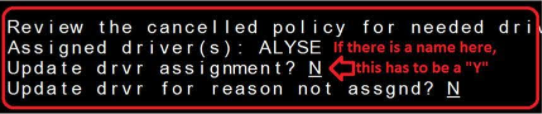
Look for the recent cancellation in NECHO, identify who did it, and copy and paste the memo into ECRM as a task assigned to them, and "tag" them on the task.
Task Subject Line:
UMEMO: Unassigned driver as a result of cancelled policy.
Task Notes:
@Tyra you cancelled the policy for /Sean Morton and didn't indicate where /Gary should be assigned. Please submit through NECHO and close this task when complete.
This comes in prior to the renewal, and Underwriting is requesting a new Estimated Replacement Cost (ERC).
It is likely there is no current ERC on file.
Send SMS to customer
Your homeowners insurance renewal is coming up. Please contact the office to complete an updated Estimated Replacement Cost estimate. We appreciate your business.
This comes in prior to the renewal, and Underwriting is requesting a new Estimated Replacement Cost (ERC).
It is likely there is no current ERC on file.
Send SMS to customer
This is from 's office. Your homeowners insurance renewal is coming up. Please contact the office to complete an updated Estimated Replacement Cost estimate. We appreciate your business.
Simply forward the email to the customer.
XXXXX,

Below is a copy of a letter from our corporate office.

Please let me know if you have any questions.

Thank You,
When a letter is mailed out, emailing is just a courtesy.
1. Send Email Template: Underwriting Memo – Odometer
We email AND text for the 1st 2 attempts.
2. Send SMS Template
We need the odometer reading for the XXXXXXX to continue your discount.
3. Set 10 Day Pend to Follow Up
Sample ECRM Task Subject:
UMEMO: Accurate Odometer reading for XXXXX?; em/sms 09/27
Leave good bread crumbs for where you are in the process. Be sure to start with "UMEMO: " in the subject line so the filters pick it up on the Underwriting Memo.

2. Send SMS Template
This is from 's office. We need the odometer reading for the XXXXXXX to continue your discount.
3. Set 10 Day Pend to Follow Up
Sample ECRM Task Subject:
UMEMO: Accurate Odometer reading for XXXXX?; em/sms 09/27
Leave good bread crumbs for where you are in the process. Be sure to start with "UMEMO: " in the subject line so the filters pick it up on the Underwriting Memo.
1. Send "Underwriting Memo - Home Alert" Email Template
2. Send SMS to customer
We need a copy of your home alarm certificate. Please send to forms@xxxxxxx.com
3. Save copy of sent email to ECRM
- "Reply All" to get all info from sent email for the copy to paste into Comments
- ECRM has limited space, so may need to delete extra spaces
4. Update Task Subject Line
UMEMO: Need home alert certificate; em/sms 09/27

2. Send SMS to customer
This is from 's office. We need a copy of your home alarm certificate. Please send to forms@xxxxxxx.com
3. Save copy of sent email to ECRM
- "Reply All" to get all info from sent email for the copy to paste into Comments
- ECRM has limited space, so may need to delete extra spaces
4. Update Task Subject Line
UMEMO: Need home alert certificate; em/sms 09/27
This comes up because SF thinks the property may be vacant.
1. Send Vacancy Email Template
We email AND text for the 1st 2 attempts.
2. Send SMS Template: Underwriting Memo – Vacancy
I just sent you an email about the property located at XXXXXXXXXXXX. Please take a look and get back to me.
3. Set 10 Day Pend to Follow Up
Sample ECRM Task Subject:
UMEMO: Is the HH at XXXX Vacant?; em/sms 09/27
Leave good bread crumbs for where you are in the process. Be sure to start with "UMEMO: " in the subject line so the filters pick it up on the Underwriting Memo.

Verify with customer via text / email / call & submit removal via NECHO.
2. Send SMS Template: Underwriting Memo – Vacancy
This is from 's office. I just sent you an email about the property located at XXXXXXXXXXXX. Please take a look and get back to me.
3. Set 10 Day Pend to Follow Up
Sample ECRM Task Subject:
UMEMO: Is the HH at XXXX Vacant?; em/sms 09/27
Leave good bread crumbs for where you are in the process. Be sure to start with "UMEMO: " in the subject line so the filters pick it up on the Underwriting Memo.
Verify with customer via text / email / call & submit removal via NECHO.
1. Send U04S from ECRM
2. Send SMS Template
We email AND text for the 1st 2 attempts.
You have an unpaid balance on your account. Please call our office or pay online at http://st8.fm/sfpay.
3. Set 10 Day Pend to Follow Up on Unpaid Balance/Late Pay
Sample ECRM Task Subject:
UMEMO: Unpaid Balance/Late Pay for XXXXX; em/sms 09/27
Leave good bread crumbs for where you are in the process. Be sure to start with "UMEMO: " in the subject line so the filters pick it up on the Underwriting Memo.
2. Send SMS Template
We email AND text for the 1st 2 attempts.
This is from 's office. You have an unpaid balance on your account. Please call our office or pay online at http://st8.fm/sfpay.
3. Set 10 Day Pend to Follow Up on Unpaid Balance/Late Pay
Sample ECRM Task Subject:
UMEMO: Unpaid Balance/Late Pay for XXXXX; em/sms 09/27
Leave good bread crumbs for where you are in the process. Be sure to start with "UMEMO: " in the subject line so the filters pick it up on the Underwriting Memo.
This comes up because SF doesn't provide all policies covered by the PLUP / CLUP, or the amount of coverage triggers the renewal.
SF requires a Dec Page every year to prove the customer has the correct coverage on all policies, and nothing has lapsed.
- Check ECRM to see if any Agent Staff is working within the household.
- Check ECRM to see if there is an open Task with Notes regarding the PLUP / CLUP renewals from the past.
1. Send "Underwriting Memo - PLUP Renewals" Email Template
2. Send SMS to customer
I just sent you an email regarding your Umbrella Renewal. Please call us with questions.
3. If you want to track this, save copy of sent email to ECRM.
- "Reply All" to get all info from sent email for the copy to paste into Comments
- ECRM has limited space, so may need to delete extra spaces
4. Create ECRM Task with Subject line
UMEMO: PLUP renewal questionnaire needed; em/sms 09/27

Follow 10 day process. Once you receive the information or make contact with the customer, you need to fill out the PLUP Renewal Questionnaire PDF. This is found on SF Forms by searching "umbrella." Attach the PDF and declarations pages to a NECHO change against the PLUP.
2. Send SMS to customer
This is from 's office. I just sent you an email regarding your Umbrella Renewal. Please call us with questions.
3. If you want to track this, save copy of sent email to ECRM.
- "Reply All" to get all info from sent email for the copy to paste into Comments
- ECRM has limited space, so may need to delete extra spaces
4. Create ECRM Task with Subject line
UMEMO: PLUP renewal questionnaire needed; em/sms 09/27
Follow 10 day process. Once you receive the information or make contact with the customer, you need to fill out the PLUP Renewal Questionnaire PDF. This is found on SF Forms by searching "umbrella." Attach the PDF and declarations pages to a NECHO change against the PLUP.
1. Save copy of PLUP renewal UW memo to ECRM
- "Reply All" to get all info from email to copy and paste into Comments
- ECRM has limited space, so may need to delete extra spaces
ECRM Task Subject Line:
UMEMO: PLUP renewal questionnaire needed
Tag your coworker who is most familiar with this household:
@Jane Doe. The PLUP renewal questionnaire is required for /Customer Name. It looks like you worked with them recently, do you mind following up with them on this?
2. Follow 10 day process
Once your office receives the information or makes contact with the customer, you need to fill out the PLUP Renewal Questionnaire PDF. This is found on SF Forms by searching "umbrella." Attach the PDF and declarations pages to a NECHO change against the PLUP.
Copy & Paste the Memo into an ECRM Task
The memo should be pasted in the comments section.
ECRM Task Subject Line: UMEMO: Address Mismatch
Assigned To: Coworker
Due Date: September 27, 2026
Delete the underwriting email.
This comes up because SF has decided to nonrenew the policies in the email notice.
The agent needs to determine if an appeal should be submitted.
- Reply to the memo to get a time stamp of the original office notification (but do not send anywhere).
- Copy and paste the body of the email into an ECRM Task. The memo should be pasted in the comments section.
ECRM Task Subject Line: UMEMO: Nonrenewal notice.
Assigned To: Agent for review
Due Date: September 27, 2026
Tag agent in Chatter: Appeal necessary?
1. Send "Business - Audit Information" Email Template
2. Send SMS to customer
It's time for your insurance audit on your business policy. State Farm has contracted XXXXXXXX to perform your audit. Expect them to reach out soon! Let us know if you have any questions.
3. If you want to track this, save copy of sent email to ECRM.
- "Reply All" to get all info from sent email for the copy to paste into Comments
- ECRM has limited space, so may need to delete extra spaces
4. Create ECRM Task with Subject line
ECRM Task Subject Line:
UMEMO: Work Comp Audit; em/sms 09/27
Follow 10 day process.
2. Send SMS to customer
This is from 's office. It's time for your insurance audit on your business policy. State Farm has contracted XXXXXXXX to perform your audit. Expect them to reach out soon! Let us know if you have any questions.
3. If you want to track this, save copy of sent email to ECRM.
- "Reply All" to get all info from sent email for the copy to paste into Comments
- ECRM has limited space, so may need to delete extra spaces
4. Create ECRM Task with Subject line
ECRM Task Subject Line:
UMEMO: Work Comp Audit; em/sms 09/27
Follow 10 day process.
This comes up because SF has discontinued the Withdrawal from Use Program.
This gave a discounted rate to the policy because the underlying policies were not in use.
1. Reply to the memo to get a time stamp of the original office notification (but do not send anywhere).
2. Copy and paste the body of the email into ECRM.
The memo should be pasted in the comments section.
ECRM Task Subject Line: UMEMO: Withdrawal from Use Program
Due Date: None — this is just logging the correspondence.
Status: Closed
3. Consider forwarding the email to the customer.
Forward the email to the customer with a simple note. Example:
XXXXXXXXXXXX,

Below is a copy of a letter our corporate office mailed you recently.  Please reach out if you have any questions.

Thanks!
This comes up because SF is reminding your office to transfer the PAP / PLUP to a new state.
Other policies have transferred, which caused this notice to be sent because everything should be in their resident state.
Send policy info to agent in new state.
Reply via NECHO remarks why the mailing address is out of state.
This is simply a copy of the Driver Exclusion Agreement.
In some states (like Colorado), you can submit a Driver Exclusion Agreement for esignature. Use the esignature process.
Look for the recent transaction in NECHO, identify who submitted the exclusion, and copy and paste the memo into ECRM as a task assigned to them, and "tag" them on the task.
Task Subject Line: UMEMO: Driver Exclusion for XXXXXX
Task Notes:
@Tyra you submitted a driver exclusion for /Sean Morton and the customer needs to sign and return. Please follow up with them because the policy will cancel without this signed exclusion form.
This comes up because SF wants to know if this policy should be cancelled, vacancy endorsement added, etc.
The customer may also need to change this to a home or condo instead of a rental. Basically, you can't change the address on fire policies without an explanation of what is going on!
This comes up because SF needs the signed paperwork. It is now too late, so the discount will be removed.
Verify in ECRM that you've reached out for the discount paperwork. If not, start the hunt for the forms. If so, decide whether one final text or email is necessary.
This comes up because underwriting needs the renewal quote.
Open the ENOL Quote Tool and submit the PDF via NECHO for further handling by underwriting. Additional help can be found by visiting the BLRC.
This comes up because the youthful driver received a ticket or had an at-fault accident.
Decide how you want to handle it. In most states, the customer will receive a NOPI (Notice of Premium Increase) letter explaining the premium increase. Some offices take no action, while others reach out to the policyholder to give them the heads up from the office (and not just the letter).
In Sean's office, we do nothing and play defense if/when the customer calls in. Typically we have had a conversation or prepared them during the claim that the SCD would fall off.
This comes up because SF records show a discrepancy in odometer readings.
Verify with customer via text / email / call current & accurate odometer reading. Submit through NECHO.
This comes up because SF thinks the property may be paid off.
1. Send Mortgagee Payoff Email Template
2. Send SMS Template
We email AND text for the 1st 2 attempts.
We were notified that your mortgage may have been paid off or the company changed. Please let us know if we need to make any updates on our end. Thanks!
3. Set 10 Day Pend to Follow Up
Sample ECRM Task Subject:
UMEMO: Mortgage Paid off?; em/sms 09/27
Leave good bread crumbs for where you are in the process. Be sure to start with "UMEMO: " in the subject line so the filters pick it up on the Underwriting Memo.

Verify with customer via text / email / call & submit removal via NECHO.
2. Send SMS Template
We email AND text for the 1st 2 attempts.
This is from 's office. We were notified that your mortgage may have been paid off or the company changed. Please let us know if we need to make any updates on our end. Thanks!
3. Set 10 Day Pend to Follow Up
Sample ECRM Task Subject:
UMEMO: Mortgage Paid off?; em/sms 09/27
Leave good bread crumbs for where you are in the process. Be sure to start with "UMEMO: " in the subject line so the filters pick it up on the Underwriting Memo.
Verify with customer via text / email / call & submit removal via NECHO.
This comes up because SF has records of another customer insured at the same address!
Verify with customer via text / email / call if the other party is a member of their household. Submit remarks or add them as a household member via NECHO.
Be aware that MCD, MLD, and uninsured motorist issues can arise depending on the situation.
This comes up because SF is sending a letter to the insured with recent Claim / MVR / Accident activity.
Check with the agent if they want the letter to go out.
Some agents prefer to let all caution letters go out to policyholders.
ECRM Task Subject Line: UMEMO: Caution Letter
Assigned To: Agent for review
Due Date: September 27, 2026
Tag agent in Chatter: Should this go out?
These typically come about because the address that was entered for the bank is incorrect, and corporate received returned mail.
Look for the recent transaction in NECHO, identify who did it, and copy and paste the memo into ECRM as a task assigned to them, and "tag" them on the task.
Task Subject Line: UMEMO: Incorrect Address for Bank
Task Notes:
@Tyra you updated the policy for /Sean Morton and the address you entered for the financial institution is incorrect. Please reach out to the customer to verify the correct address and submit through NECHO and close this task when complete.
This comes up because someone submitted an address change on a renters policy through NECHO.
You have to do a new application to change the location for renter's insurance. Do it quickly, because the existing policy will be nonrenewed without a response.
This comes up because the 1st name insured has changed. The new 1st named insured is entitled to all credits (money and longevity applied to the policy).
The Release of Credits form is required to get in writing from the original 1st name insured that they acknowledge that they are gifting these credits to the new 1st name insured.
Call the family to determine accuracy.
Underwriting requires information
- Does the name insured need to be updated?
- Status of Home/Autos?
- Is there a plan?
We may need to make changes such as adding a vacancy endorsement or changing the name insured to "The Estate of XXXXXXX".
Tag the agent and ask them to send a Sympathy Card from the agency to ease the blow for confirming the sensitive subject.
Courteously apologize for the inconvenience and explain that you will notify corporate.
Submit NECHO Remarks to UW that this was an inaccurate notice.
When suspensions are submitted, this allows the policy to be suspended until the end of the current renewal, plus the full next renewal.
Prior to the end of the full renewal, they send a letter that inquires about the status of the vehicle.
Send the email below and/or call the customer to determine if coverage can be reactivated. If the vehicle was gifted, a Release of Credit form may be required.
Confirm previous coverage
Process NECHO change to reactivate coverage
2. Send SMS Template: Underwriting Memo – Suspended Auto
We email AND text for the 1st 2 attempts.
Coverage on the XXXXXX has been suspended for several months, and our corporate office needs to know if we should keep the policy open or let it expire. Please let me know your plans and I'll let you know the steps we need to take.
3. Set 10 Day Pend to Follow Up
Sample ECRM Task Subject:
UMEMO: Not Defector – Vehicle Suspension Program; em/sms 09/27
Leave good bread crumbs for where you are in the process. Be sure to start with "UMEMO: " in the subject line so the filters pick it up on the Underwriting Memo.
2. Send SMS Template: Underwriting Memo – Suspended Auto
We email AND text for the 1st 2 attempts.
This is from 's office. Coverage on the XXXXXX has been suspended for several months, and our corporate office needs to know if we should keep the policy open or let it expire. Please let me know your plans and I'll let you know the steps we need to take.
3. Set 10 Day Pend to Follow Up
Sample ECRM Task Subject:
UMEMO: Not Defector – Vehicle Suspension Program; em/sms 09/27
Leave good bread crumbs for where you are in the process. Be sure to start with "UMEMO: " in the subject line so the filters pick it up on the Underwriting Memo.
This notice comes in when UW required information for an Auto Application.
You need to tag the Salesperson to make them aware that they need to respond to corporate.
Sample ECRM Task Subject: UMEMO: Auto Application Information
Copy & Paste Email
Assign and Tag Salesperson
In Chatter: @[Salesperson] /[Account]
This comes in when UW ran a new Estimated Replacement Cost (ERC).
Their estimate came in different than the estimate from the agency.
This notice is an FYI. The policy will issue with the higher coverage amount.
Forward to the Salesperson so they are aware. No additional action is necessary.
There is a problem — Salesperson must contact the customer to increase coverage to match the ERC Tool Discrepancy.
ECRM Task Subject Line: UMEMO: ERC Tool Discrepancy
Copy & Paste Email
Assign and Tag Salesperson
In Chatter: @[Salesperson] /[Account] Follow Up with customer to Increase
This notice is an FYI. The customers have been selected for an underwriting survey.
Follow the instructions in the notice. Check with the agent on if your agency proactively reaches out to these customers.
This notice is an FYI. The customer's deductible is increased at renewal.
Consider reaching out to the customer to give them the heads up. There is no template for this, so you can forward the notice to them as an email and text them to call the office if they have any questions.